 Phone: (021) 073-9955
 Location: New Zealand



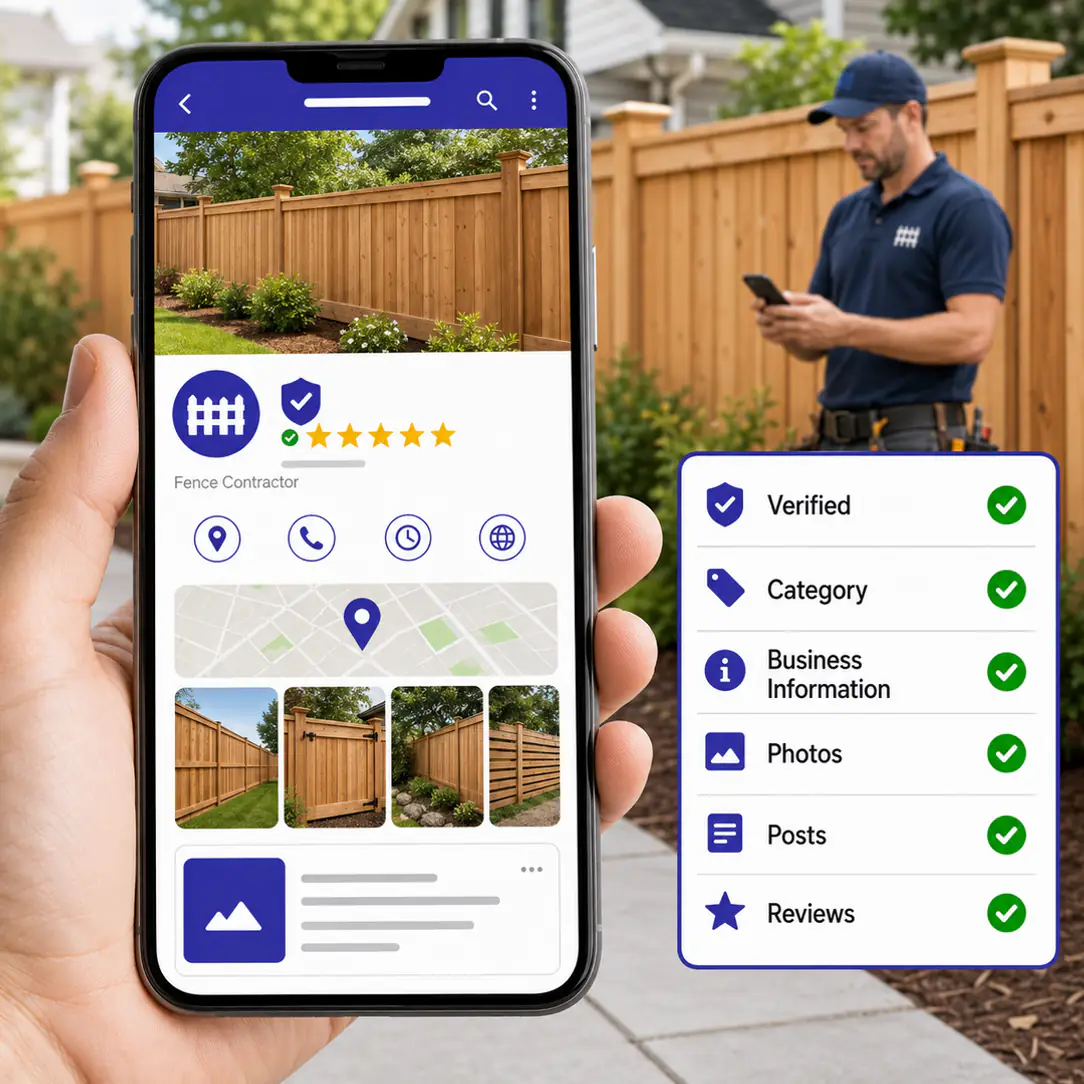
Google Business Profile Checklist for Fence Companies
Think your Google Business Profile is basically done because you claimed it two years ago and added a phone number? Google gives you dozens of fields to fill out for a reason. It knows exactly what a homeowner looks at before they decide who gets the call, and a half filled profile tells that homeowner nothing worth trusting. It's also the first thing we fix in any local SEO for fence companies project, because nothing else ranks until it's right.
Here's the part most fence company owners get wrong. They figure nobody actually reads through a business profile. They click the map, glance at the star rating, and move on. So they put in the bare minimum: a name, an address, maybe a photo from three years ago.
That's backwards. Google didn't build category selection, a 750 character description field, a photo library, and a Posts feature because none of it matters. It built all of that because buyers use it. A homeowner comparing three fence companies is reading your description, scrolling your photos, and checking when you last posted anything. If your profile looks abandoned, you've already lost that comparison before your phone rings.
We've worked through this exact fix with fence company partners more times than we can count, and it's never one thing that moves the needle. It's a handful of small fixes, done together, that turn a dead profile into one that actually pulls leads. One partner fixed his description, added real project photos, started posting through the year, and picked up reviews along the way. Inside a couple of months his weekly profile interactions were up by roughly a dozen, and form submissions started coming in behind them. Not from one change. From all twelve items below.
Key Takeaways
- Verification is the gate. Until you enter the code Google mails or calls to your business, the listing can't rank or appear in the map pack at all.
- Choose Fence Contractor as your primary category. Fence Supply Store and Deck Contractor tell Google you do something you don't, and that misplaces you in search.
- Fill every field, use all 750 description characters, up to 20 service areas, and 10 labels, and make your name, address, phone, and category match your website and every directory exactly.
- Photos after every job plus weekly Posts in season are what stop the profile from looking abandoned to Google and to the homeowner comparing three companies this month.
- Google cross checks your Business Profile against your Local Services Ads profile, so a clean, consistent profile is part of what gets you the Google Guaranteed badge.
Get the Foundation Right First
We already told you to fix your Google Business Profile first in our guide to fence company SEO. This is the full walkthrough on exactly how, item by item, starting with the four things your profile can't work without.
- 1. Claim and verify the listing
- 2. Pick the right primary category
- 3. Fill in every business info field, and make it match everywhere else
- 4. Write a real description instead of leaving the default
If you haven't claimed and verified your listing yet, nothing else on this list matters. Google mails or calls a verification code to your business address, and until you enter it, your listing can't rank or show up in the map pack at all.
Which GBP Category Should a Fence Company Actually Choose?
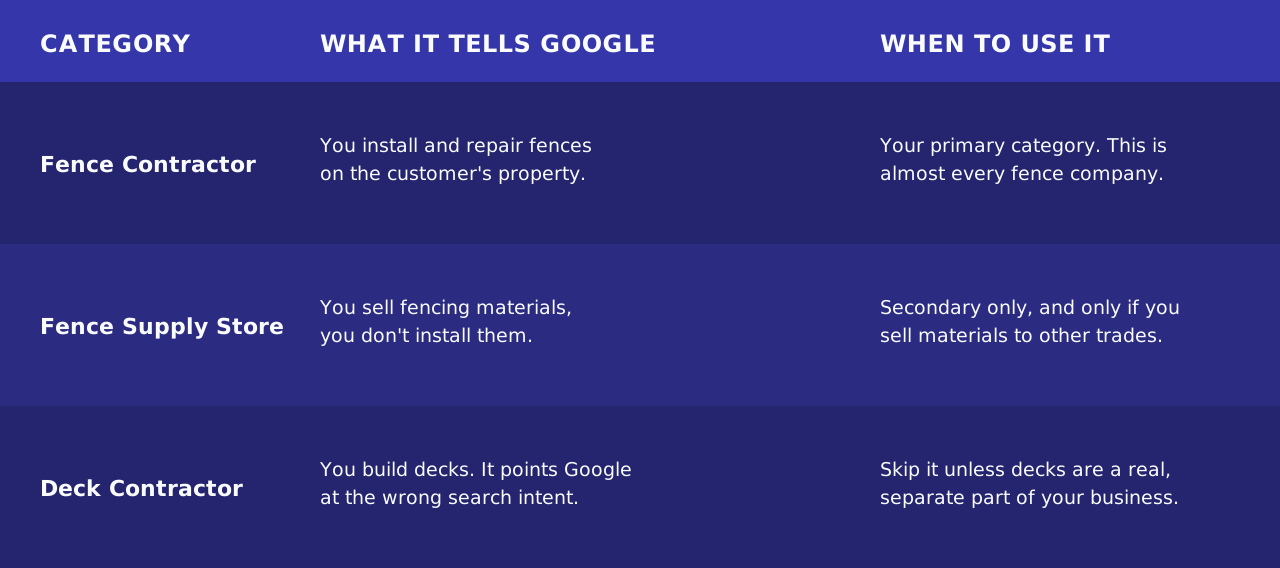
This is where most fence companies get it wrong before they even start, and it's a fixable five minute mistake. Google's business category list gives you similar sounding options: Fence Contractor, Fence Supply Store, Deck Contractor. Pick Fence Contractor. It names exactly what you do, installing and repairing fences, without the confusion of a supply store category that tells Google you sell materials rather than install them, or a deck category that puts you in front of the wrong search entirely. Google's own advice is to pick the primary category that best describes the business, then add others as secondary. So if you also sell fencing materials to other contractors, add Fence Supply Store as a secondary category. Don't lead with it.
Here's the same call in table form:
The Specific Limits Worth Knowing
You get 750 characters for your business description, up to 20 service areas, and 10 labels for extra search terms. Fill in every business info field, hours, phone number, website, service area, completely, and make sure it matches your website and every directory listing exactly. Google's guidelines for representing your business are explicit that your name, address, and phone need to be consistent everywhere, and a phone number that's different on your website than on your profile tells Google you're two different businesses, not one consistent one. Use those 750 characters to say what you actually install and the towns you serve, not generic language about quality service and competitive prices that a competitor could paste onto their own profile unchanged.
Make Your Profile Impossible to Scroll Past
Fencing might be the most visual trade there is. A finished fence is one photo away from being a sales pitch that writes itself, and most companies leave that photo sitting on a phone, never uploaded.
- 5. Post a before and after photo after every completed job
- 6. Add photos of your crew, your trucks, and the process
Not once a quarter. Every job. Google's own guidance on Business Profile photos is blunt that profiles with photos get more clicks and direction requests than profiles without them, and a before and after pair does more work than either photo alone. The before shows the problem the homeowner is trying to solve. The after shows you solved it.
A homeowner letting strangers spend two days working in their yard wants to know who's showing up, which is exactly what a crew photo answers before they ever call. What goes wrong here almost every time: a company uploads ten photos when they first set up the profile and never touches it again. Google notices a dormant photo library. So does a homeowner scrolling past three competitors whose profiles look active this month, not three years ago.
Turn a Complete Profile Into Local Services Ads Eligibility
This is the connection almost nobody writing about Google Business Profiles for fence companies mentions, and it's a big one. Local Services Ads is one of the most competitive programs Google runs for contractors, and every fence company in your area is trying to get into it. What most of them don't realize is that your Business Profile is part of what gets you there.
- 7. Match your category, name, address, and phone number to your Local Services Ads profile exactly
- 8. Get through the license and insurance verification for the Google Guaranteed badge
Google matches your Local Services Ads account to your Business Profile by name, address, phone number, and category. A mismatch between the two can slow down or block approval entirely, and it's one of the more common reasons a fence company's application sits in limbo longer than it should. The license and insurance verification itself isn't part of the Business Profile, but a clean, complete, active profile is the foundation Google's review process checks against. Show up with a half filled profile and inconsistent business info, and you're adding friction to an approval process that's already slow enough on its own.
If Local Services Ads and Google Guaranteed sound like a separate project entirely, that's because they are. This checklist gets your foundation ready. What to actually do with Local Services Ads once you're eligible is a guide of its own.
Stay Active Without Turning It Into a Second Job
- 9. Post weekly during your install season
- 10. Post monthly during your off season, and change the topic
Spring and summer, when you're actually out building fences, post the finished jobs, the before and afters, the promotions you're running. This is when homeowners are actively comparing companies, and an active profile beats a quiet one every time someone's scrolling through the map pack. Nobody's shopping for a full fence installation in January the way they are in May, so use the slow months for repair tips, gate maintenance, and winter damage warning signs instead, anything that keeps the profile from going quiet for four months straight.
A weekly post takes maybe ten minutes. Set a recurring reminder for a Friday afternoon after a job wraps, upload the photo you already took for the photo step above, write two sentences, done. The mistake isn't laziness. It's not having a system, so the posting only happens when someone remembers.
Reviews and Reputation
- 11. Ask for a review at the final walkthrough, every single time
- 12. Respond to every review you get, good or bad
We've written a full breakdown of exactly how to ask, what to say, and when to follow up in Do Google Reviews Matter for Fence Companies?, so we won't repeat all of it here. Short version: the best moment to ask is standing in the yard looking at the finished fence, not three days later over email. And when a review comes in, respond to it. A short thank you on a five star review takes fifteen seconds. A calm, professional response to a bad one shows the next homeowner reading it that you handle problems like an adult, which matters more than the one star review itself.
None of these twelve items is complicated on its own. Category selection is a dropdown menu. Photos are something you're already taking on your phone. The reason most fence companies still don't do this is that nobody laid it out item by item and told them it's worth the hour. Now you've got the list. If you'd rather have someone handle the whole thing, including the photo schedule, the seasonal posts, and the review requests, that's exactly what our local SEO service does for fence companies.
Book A CallWant to Know More?
Book A Call
Frequently Asked Questions
-
You need a verified business address or service area, a phone number, accurate hours, the correct category (Fence Contractor for most fence companies), a complete description, and photos of your actual work. Verification, usually a mailed or phone code from Google, is the step that unlocks everything else.
-
The two biggest: picking a category that doesn't match the work (Fence Supply Store or Deck Contractor instead of Fence Contractor), and setting the profile up once, then never touching it again. A profile with no new photos or posts in a year looks abandoned to both Google and the homeowner reading it.
-
Fence Contractor. It matches exactly what you do, installing and repairing fences, and avoids the confusion of Fence Supply Store, which tells Google you sell materials rather than install them. Add Fence Supply Store as a secondary category only if you actually sell fencing materials to other contractors.
-
Yes. Google cross checks your business name, address, phone number, and category against your Local Services Ads profile, so a mismatch or an incomplete Business Profile can slow down approval. A clean, verified, fully filled out profile is the foundation the Google Guaranteed review process checks against.
-
Weekly during install season, spring and summer, when you've got finished jobs and before and after photos to share. Monthly during the off season is enough, and switch the content to repair tips or maintenance advice instead of installation posts nobody's searching for in the middle of winter.